Cut It: The Font That Brings Paper-Cut Texture to Digital Design
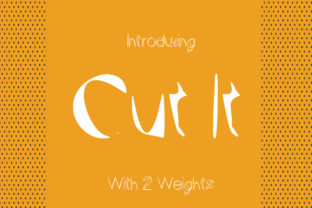
Typography is often described as the art of arranging type to make language visible. But what happens when that arrangement deliberately looks like it has been physically altered, torn, or snipped? That is exactly what the font Cut It delivers. With characters that appear to have been snapped out of paper, available in both a regular and an outlined version, Cut It brings a tactile, handmade quality to screens and printed materials alike. It is not just a typeface—it is a statement about imperfection, authenticity, and the growing desire to reintroduce the physical into the digital.
What Makes Cut It Different
Most fonts strive for smooth curves, consistent strokes, and flawless edges. Cut It does the opposite, and that is precisely its strength. Each letterform looks as though it was cut from a piece of paper with scissors or a craft knife, leaving behind slightly uneven edges, subtle gaps, and a sense of human effort. The regular version carries the raw, unpolished look of a hand-cut stencil, while the outlined variant adds a lighter, more structural feel—perfect when you want the cutout aesthetic without overwhelming the page.
This duality is rare. Having both a solid and an outlined version of the same paper-cut concept allows designers to layer text, create contrast, or use the outlined style as a subtle accent. It gives the font versatility without losing its core identity. Whether you are building a brand identity, designing a web banner, or putting together a presentation, Cut It offers a voice that is distinctively rough-edged yet deliberate.
Why Paper-Cut Typography Matters Now
We live in an era of polished digital experiences. Everything from user interfaces to social media graphics is optimized for smoothness, speed, and pixel-perfect precision. But there is a growing counter-movement. People are craving texture, imperfection, and the visible trace of human hands. This shift shows up in everything from the rise of handmade ceramics to the popularity of sketch-like illustration styles. Typography is no exception.
The Cut It font fits squarely into this trend. It answers a need for authenticity in a world saturated with sterile design. When a brand or a creator uses a typeface that looks cut out, they signal that they value craft over polish, and personality over perfection. This resonates with audiences who are tired of generic templates and want to connect with something that feels real, even if that reality comes through in the uneven edge of a letterform.
For marketers and content creators, this is a powerful tool. A headline set in Cut It immediately communicates a different tone than one set in a standard sans-serif. It says: we made this, we thought about it, and we are not afraid to show the effort. In a crowded feed, that kind of visual honesty stands out.
The Evolution of Tactile Typography
Typography has come a long way from Gutenberg’s movable type. For centuries, the goal was consistency and reproducibility. In the digital age, that goal shifted further toward readability across screens of varying sizes. But somewhere along the way, designers started pushing back. The grunge typography of the 1990s, the rise of hand-lettering, and the current obsession with variable fonts all point to the same desire: type that feels alive.
Cut It belongs to this lineage, but it takes a specific and refined approach. Rather than simulating brush strokes or chalk dust, it mimics a more deliberate act—cutting. Cutting implies intention. You do not accidentally cut paper; you choose where to snip, where to leave a bridge, and where to let the shape fall out. That intentionality comes through in the font. Each character feels planned, not chaotic. The irregularity is controlled, which makes it useful for professional contexts where you still need readability but want to inject character.
The availability of both a regular and an outlined version also reflects how designers work today. They need options. They need to pair weights, create hierarchy, and adapt to different backgrounds without switching typefaces. Cut It gives them that flexibility without forcing them to abandon the paper-cut look.
Branding and Identity
If you are building a brand for a business that values handmade goods, local craft, or personalized service, Cut It can become a visual anchor. A logo set in the regular weight feels sturdy and grounded. The outlined version can be used for secondary text or as a watermark element. Together, they create a cohesive system that tells a story about the brand’s values before a single product is described.
For example, a small-batch soap maker could use Cut It for product labels, pairing the regular weight for the product name and the outlined version for ingredients or scent notes. The result is a label that looks like it was hand-stamped, even if it was printed by the hundreds. That perceived authenticity can justify premium pricing and build customer trust.
Web and Interface Design
Using a font that mimics cut paper on a digital screen might sound contradictory, but it works exceptionally well when applied thoughtfully. Headlines, call-to-action buttons, or section dividers set in Cut It break the monotony of standard web typography. The outlined version is especially effective on dark backgrounds, where it reads as a negative space cutout—exactly as if someone had snipped the text from a sheet of paper and placed it over a dark surface.
This approach fits modern design systems that embrace neumorphism, brutalism, or any style that values texture. It also aligns with the trend toward "honest design," where digital interfaces show their material inspiration rather than hiding it.
Content Marketing and Social Media
Bloggers, educators, and freelancers can use Cut It to create distinctive visual quotes, headers, and badges. Because the font draws attention without being loud, it works well for emphasis within longer content. A single word or short phrase in Cut It can anchor a reader’s gaze and reinforce the message. The outlined version is particularly effective for overlays on images, where a solid fill might compete with the photo.
For social media, where standing still is the real challenge, using a unique typeface like Cut It can be a subtle differentiator. Followers may not know why a post feels different, but they will sense the texture and intention. Over time, that builds a recognizable style.
Realistic Examples of Use
Imagine a freelance illustrator updating their portfolio site. They want the homepage to feel artistic but professional. They set their name in the regular weight of Cut It at a large size, and use the outlined version for the tagline beneath. The contrast between solid and outline creates depth, and the paper-cut look aligns perfectly with an illustrator’s hand-drawn work. The site feels cohesive because the typography echoes the craftsmanship of the imagery.
Or consider an entrepreneur launching a line of organic teas. The packaging needs to feel natural and artisanal, but also readable on a shelf. Using Cut It for the tea name and flavor descriptor immediately communicates a handmade ethos. The slightly irregular edges suggest that each box is part of a small batch, even if production is scaled. Paired with muted colors and a matte finish, the typography becomes a key part of the product’s story.
For a marketer preparing a presentation on sustainable business practices, Cut It can be used for slide titles. The paper-cut aesthetic reinforces themes of resourcefulness, simplicity, and thoughtful design. It subtly supports the content without needing to explain itself.
Practical Recommendations for Using Cut It
- Pair it with clean fonts. Because Cut It carries so much texture, it works best when surrounded by simpler typefaces. A neutral sans-serif for body text lets the paper-cut elements shine without visual clutter.
- Use the outlined version sparingly. The outlined weight is excellent for emphasis, but using it for long paragraphs can reduce readability. Reserve it for short phrases, captions, or decorative elements.
- Test on different backgrounds. The cutout effect is most convincing when the background color contrasts clearly with the text. White or light backgrounds work well with the regular weight; darker backgrounds make the outlined version pop.
- Consider scale. Cut It looks best at larger sizes where the irregular edges are visible. At very small sizes, the intentional unevenness might be mistaken for a rendering error. Use it at 24 points or above for maximum impact.
- Stay true to the tone. Cut It is not the right choice for corporate financial reports or legal documents. It thrives in contexts where personality, craft, and approachability are assets.
How Cut It Fits Changing User Expectations
People are more design-literate than ever. They notice when a font feels generic, and they respond when a typeface adds meaning. The Cut It font speaks to an audience that values intention. It tells users that someone made a choice, not just about what to say, but about how the words should feel.
This matters in a time when trust in polished, corporate messaging is declining. Audiences increasingly prefer brands and creators who show their process, their materials, and their humanity. A font that looks cut from paper does exactly that. It reveals the construction. It does not pretend to be perfect. And that imperfection becomes a reason to trust.
For educators and freelancers who rely on clarity and connection, Cut It can be a bridge. It makes digital content feel more like a physical handout or a handwritten note. In remote learning environments, where students are staring at screens all day, any element that breaks the sterile uniformity of digital text can improve engagement. A headline in Cut It feels like a break from the screen, even though it is on it.
Looking Ahead Without Overpromising
No single font will change the course of design, but Cut It represents a broader shift that is worth paying attention to. The desire for tactile, imperfect, and expressive typography is not a passing fad. It is a response to the over-optimization of digital life. As more tools emerge for creating texture in type—from variable fonts to generative design—the principles behind Cut It will only become more relevant.
The regular and outlined versions give it a practical edge. They allow for layered compositions without needing multiple typefaces. That economy of style is valuable for anyone working within tight creative constraints, which is almost everyone. Whether you are a business owner designing your own materials, a blogger refining your visual voice, or a marketer searching for something different, Cut It offers a straightforward way to add texture, meaning, and a touch of human effort to your words.
Typography does not always have to be invisible. Sometimes, it should look like someone cut it out with scissors, held it up to the light, and decided it was exactly right. That is what Cut It does. It reminds us that even in a digital world, the best communication often feels like it was made by hand.