Funny Faces: Choosing and Using a Whimsical Font Without Regret
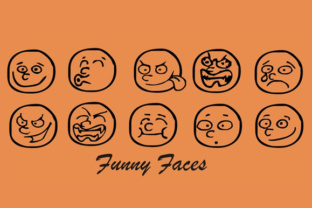
A font that literally grins back at you sounds like a guaranteed win. The Funny Faces font by Gustavo Luis Lucero delivers exactly what its name promises: characters infused with personality, from sly winks to full-on grins. It is a display typeface designed to catch attention, spark a smile, and break the monotony of cold, neutral lettering. Yet many people who download it end up frustrated, disappointed, or with a project that looks more chaotic than charming. The issue is rarely the font itself. It is almost always how people choose, apply, or evaluate it before they start designing. If you are considering Funny Faces for a project, understanding a few common pitfalls can save you time, money, and a headache.
Treating Funny Faces as a Versatile Workhorse
The most frequent mistake is treating this font like a general-purpose typeface. Funny Faces is not a body text font. It is not suitable for paragraphs, lengthy emails, or formal documents. Each letter carries decorative weight, and reading more than a few words set in it becomes tiring. People who use it for long headlines, blog post bodies, or product descriptions often find that readers simply stop reading.
What happens instead: Legibility drops, the message gets lost in the novelty, and the design looks amateurish. The font's charm becomes a distraction rather than a feature.
A better approach: Reserve Funny Faces for short, punchy text. A single word, a short phrase, a logo mark, or a callout on a poster works beautifully. Let it be the accent, not the main voice. Pair it with a clean, neutral sans-serif like Open Sans or Lato for any supporting text. This creates contrast and lets the personality of Funny Faces shine without overwhelming the viewer.
Ignoring Readability at Small Sizes
Funny Faces is a display font, and like most display fonts, its readability drops sharply at small sizes. The expressive features that make it delightful at 48 points become muddled at 14 points. Eyes, mouths, and decorative details blur together, and the character shapes lose definition.
The consequence: The font becomes frustrating to read. People squint, misinterpret letters, or simply give up. This is especially damaging in contexts where quick comprehension matters, such as call-to-action buttons, navigation labels, or mobile screens.
What to check before using it: Test the font at the actual output size you plan to use. Zoom in and out. Look at it on a phone screen. If the details are hard to make out at the intended size, consider bumping up the size or switching to the font for a larger application. A general rule: if you need to go below 24 points for a headline or 36 points for a wordmark, Funny Faces may not be the right choice for that specific use case.
Overlooking Font Licensing and Download Sources
Gustavo Luis Lucero's Funny Faces font is a creative work, and like any creative work, it comes with specific usage rights. Many people assume that because a font is available for free download, it can be used commercially without restriction. This is not always true. Some free versions allow personal use only, while commercial use requires a license purchase. Others restrict usage in certain media, such as in apps, embroidery, or merchandise.
The common mistake: Downloading the font from a random website without verifying the license terms. Later, a small business owner or freelancer might receive a takedown notice, a bill for back licensing, or find their project disqualified from a contest or publication.
How to avoid this: Always download Funny Faces from the original source or a reputable, well-known font marketplace. Check the license file or the page description thoroughly. If the license says "personal use only," do not use it for client work, paid products, or commercial branding. If you need a broader license, purchase the commercial version. It is a small investment that protects your work and respects the designer's effort.
Using Funny Faces in the Wrong Context or Audience
A playful, face-filled font is not appropriate for every message or every audience. Using it for a legal firm's website, a financial report cover, or a funeral program would create a jarring disconnect. Even within creative fields, context matters. A children's party invitation is a natural fit. A pitch deck for a venture capital presentation is not.
The mistake in practice: People fall in love with the font's look and force it into projects where it undermines trust, seriousness, or clarity. The result is a design that feels out of touch or immature for its intended audience.
A better way to decide: Ask yourself what emotional tone your project needs. Funny Faces communicates playfulness, informality, warmth, and a touch of irreverence. If those qualities align with your brand voice or message, the font can be a powerful tool. If you need to convey professionalism, authority, or calm, choose a more neutral typeface. You can always add a playful accent with colors, illustrations, or layout instead.
Failing to Pair Funny Faces With Complementary Design Elements
Even when used appropriately, Funny Faces can look awkward if surrounded by mismatched design choices. A font with such strong personality demands a careful environment. Busy backgrounds, clashing colors, or competing decorative elements create visual noise. The font's charm gets buried under the chaos.
What often goes wrong: A user places Funny Faces on a patterned background with multiple colors, adds a heavy border, and throws in a second decorative font. The result is overwhelming. The message gets lost, and the design feels amateurish.
How to avoid clutter: Treat Funny Faces as the star of your layout. Give it plenty of white space. Use solid, muted, or light backgrounds. Limit your color palette to two or three colors at most. If you use an illustration or icon, keep it simple and aligned with the playful mood. Every element should support the font, not compete with it.
Misjudging Spacing and Layout
Because Funny Faces characters have irregular shapes, standard letter spacing and line spacing defaults often look off. The eyes and mouths create visual weight in unexpected places. Without manual adjustment, the text can feel cramped, unbalanced, or hard to read.
The overlooked detail: People rely on default spacing in design software without considering how the font's unique shapes interact. The result is uneven whitespace between letters, awkward line breaks, and a general lack of polish.
Practical advice: After setting your text, manually adjust kerning and tracking. Look at each letter pair. Increase line height to give the characters room to breathe. Test different alignments. Centered alignment often works well for short phrases in Funny Faces because it balances the irregular shapes. Left alignment can work too, but avoid justified alignment, which stretches spacing unpredictably.
Overusing the Font Within a Single Project
Another common pattern is using Funny Faces everywhere in a project: the title, subtitle, captions, labels, and even small notes. The novelty wears off quickly, and the design starts feeling repetitive rather than playful.
How it affects the result: The project loses hierarchy. Everything looks equally important, which means nothing stands out. The reader's eye has no clear path through the content.
A better approach: Use Funny Faces once or twice in a project. Make it the hero element, then use a simpler font for everything else. For example, a poster might use Funny Faces for the event name and a clean sans-serif for the date, location, and details. This creates visual variety and reinforces the font's impact when it appears.
Skipping the Test Print or Mockup
People often design on screen and never see how Funny Faces looks in its final medium. A font that looks playful on a monitor might print poorly on certain materials, or its fine details may be lost on a large banner viewed from a distance. In digital contexts, the font might render differently across browsers or operating systems if not embedded properly.
The risk: The final product looks different from what you designed. Details disappear, colors shift, and the layout feels off. By the time you catch it, it may be too late or costly to fix.
Simple steps to avoid regret: Always create a mockup or test print before finalizing your design. Test the font at the actual output size and on the actual medium. For digital projects, embed the font using @font-face or use a reliable font hosting service to ensure consistent rendering. If you are using a free version, check whether it includes all the characters and weights you need before locking in your design.
Not Considering the Font's Roots and Designer Intent
Gustavo Luis Lucero designed Funny Faces with a specific creative vision. Understanding that intent helps you use it more authentically. The font is not just a collection of letters with faces. It is a deliberate blend of typography and illustration, meant to evoke warmth, humor, and approachability. When you treat it as a generic "fun font" without respecting its character, you miss an opportunity to create a design that feels intentional and cohesive.
What this means practically: Let the font guide your overall visual direction. If the letters are smiling, the rest of the design should smile too. Use bright, friendly colors. Choose imagery that is warm and inclusive. Write copy that matches the tone. When everything aligns, the font does not feel like a gimmick. It feels like a natural voice.
Final Thoughts on Making Funny Faces Work for You
Funny Faces by Gustavo Luis Lucero is a genuinely charming typeface that can elevate projects when used with care. The key is understanding its strengths and limitations before you commit. Reserve it for short, prominent text. Test it at your intended size. Check the license. Pair it with simple design elements. Let it be the accent, not the whole conversation. When you avoid the common mistakes of misuse, overuse, and misjudgment, this font becomes a reliable tool for creating work that connects, communicates, and earns a smile. That is the goal of any good design, and getting there starts with a better choice from the very beginning.