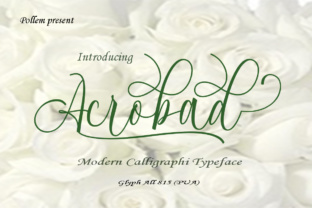
Acrobad: A Handwritten Script Font with Exceptional Versatility
Typography is one of those subtle forces that shapes how we perceive everything we read. Whether you're designing a wedding invitation, building a brand identity, or laying out a magazine spread, the typeface you choose sends a message before anyone reads a single word. Acrobad, a handwritten script font created by Polem, offers something rare: an organic, expressive feel backed by an extraordinary level of technical polish. With more than 815 unique glyphs and 591 alternate characters, this is not just another script font — it's a toolbox for creative expression.
What Makes Acrobad Different from Other Script Fonts
Most handwritten fonts fall into one of two camps. Either they look charming but lack the glyph variety needed for professional work, or they feel stiff and repetitive because the alternates are too few. Acrobad sidesteps both problems. The sheer number of alternate characters — 591 — means you can compose headlines, logos, or short paragraphs without the same letterform appearing twice in a row. That alone changes the way your text reads. It feels genuinely hand-lettered, not typed.
The font was designed by Polem, a type foundry with a reputation for producing character-rich, expressive typefaces. Acrobad carries that DNA forward. Every stroke has a natural rhythm. There's a slight irregularity in the baseline, a variation in letter width, and a warmth that cold, geometric fonts simply cannot replicate. But unlike many handwritten fonts that sacrifice readability for personality, Acrobad maintains clarity. Ascenders and descenders are balanced, and the spacing between letters — even with alternates swapped in — remains pleasant to the eye.
The Glyph Set: More Than Just Letters
The 815+ glyphs in Acrobad go beyond standard A–Z coverage. You get:
- Full uppercase and lowercase sets with multiple alternates for most letters
- Ligatures that smooth out awkward letter combinations
- Swashes and flourishes that add decorative flair to beginning or ending letters
- Extensive punctuation and symbols suitable for multilingual typography
- Stylistic sets that let you switch between different moods — bouncy, restrained, ornate, or clean
What this means in practice is that you are not stuck with one version of Acrobad. You can customize the look of every word. If you are designing a logo and want the first and last letters to have flourishes while keeping the middle simple, you can do that. If you are writing out a quote and want every "g" to have a descending loop, you toggle that alternate in. The font gives you control instead of locking you into a single interpretation.
Who Benefits from Using Acrobad
It is tempting to say "everyone," but that would not be helpful. Acrobad shines brightest in specific contexts, and knowing those contexts helps you decide if it fits your project.
Graphic Designers and Brand Identity Creators
If you build brand identities for small businesses, creatives, or lifestyle brands, Acrobad offers a distinctive voice. It works well for logo typography, especially when paired with a clean sans-serif for body text. The abundance of alternates means you can create a wordmark that looks truly custom without commissioning a hand-lettering artist. That saves time and budget while delivering a professional result.
Event and Wedding Stationery Designers
Handwritten scripts are a staple of wedding invitations, save-the-dates, and event programs. Acrobad fits naturally here. The swashes and flourish alternates let you decorate names, dates, and venue lines with elegance. Because the font supports multiple stylistic sets, you can create a cohesive suite of materials — invitations, menus, place cards, thank-you notes — all using the same typeface but with enough variation to keep each piece feeling fresh.
Small Business Owners and Entrepreneurs
If you run a boutique, a café, a creative studio, or an online shop, your visual identity matters. Acrobad can be used for social media graphics, product packaging, signage, and website headers. It conveys personality and approachability without looking amateurish. The alt characters help you stand out in a crowded feed where everyone seems to use the same popular script fonts.
Content Creators and Social Media Managers
For YouTube thumbnails, Instagram quotes, or Pinterest pins, a handwritten font can add warmth and authenticity. Acrobad's readability at medium to large sizes makes it practical for overlays and headers. And because it includes a full set of punctuation and symbols, you can use it for captions or short text blocks without switching fonts mid-sentence.
Real-World Applications and Scenarios
Let me walk through a few concrete examples where Acrobad can make a noticeable difference.
Scenario 1: A Bakery Rebrands Itself
A locally loved bakery wants to refresh its packaging and social media presence. The owner wants something that feels homemade but polished. Acrobad is used for the logo — the word "Flour & Honey" set with swash capitals and a subtle ligature between the "r" and "&." On the packaging, the same font appears in a slightly more restrained stylistic set for ingredient lists and taglines. The result is cohesive, warm, and professional. Customers perceive the brand as artisanal and detail-oriented.
Scenario 2: A Freelance Designer Creates a Portfolio
A graphic designer needs a header typeface that reflects their creative personality. They choose Acrobad for section titles and project names. The alternate characters allow them to vary the look of each page while maintaining a consistent brand voice. Potential clients see a portfolio that feels handcrafted, not templated. The designer reports that the font helps them land projects with clients who value custom aesthetics.
Scenario 3: A Wedding Stationery Suite
A bride-to-be wants invitations that feel romantic but not overly ornate. Acrobad is used for the couple's names and the ceremony date, with swashes added to the first and last letters. The same font in a simpler variant appears on the RSVP card and directions insert. The suite looks unified yet varied, and the bride appreciates that she could customize the alternates herself without hiring a calligrapher.
Strengths and Considerations When Using Acrobad
No font is perfect for every situation. Understanding Acrobad's strengths and limitations helps you use it wisely.
Strengths
- Exceptional glyph variety: The 591 alternates give you freedom to customize every letter. This is the font's standout feature.
- Natural handwritten feel: The strokes have a genuine, unpolished rhythm that avoids looking mechanical.
- Broad language support: The extended glyph set covers many European languages, making it suitable for international projects.
- Versatility across mediums: Works well in print and digital contexts — invitations, logos, social media, packaging, and more.
- Easy alternates access: Most design software (Adobe Illustrator, Photoshop, InDesign, Affinity, and even some web tools) supports OpenType features, so you can toggle alternates without extra plugins.
Considerations and Limitations
- Not ideal for long body text: Like most handwritten scripts, Acrobad is best reserved for headlines, short phrases, and decorative uses. Reading extended paragraphs in this style would fatigue the eye.
- Requires thoughtful spacing: Because the font has variable letter widths, you may need to manually kern certain letter pairs, especially when using flourishes. Allow extra time for fine-tuning.
- Not all alternates work together: Some stylistic sets are designed to be used in specific combinations. Experimenting is part of the process, but you may occasionally encounter a pair that looks unbalanced. That is normal with any highly decorative font.
- Best at medium to large sizes: At very small sizes (under 12pt), the finer details of swashes and alternates may become difficult to read. Reserve the decorative variants for larger display settings.
How to Evaluate If Acrobad Is Right for Your Project
If you are considering Acrobad, here is a practical way to decide:
- Define the tone you want. Do you need warmth, personality, and a handcrafted feel? Acrobad delivers that. If you need neutrality or strict minimalism, a clean sans-serif would be a better fit.
- Consider the medium. Are you designing something primarily digital or print? Acrobad works well in both, but make sure to test legibility at your intended size and resolution.
- Assess your willingness to customize. The font's power comes from its alternates. If you are willing to spend time exploring stylistic sets and swapping characters, you will get far more value from it. If you prefer a set-it-and-forget-it font, a simpler script may serve you better.
- Test with real content. Download the specimen or trial version if available. Typeset actual words from your project — not just "Lorem ipsum." See how the letters interact, how the swashes behave, and whether the rhythm matches your vision.
- Pair it thoughtfully. Acrobad pairs well with neutral sans-serif fonts like Proxima Nova, Montserrat, or Open Sans for body text. Avoid pairing it with another decorative script, as that can create visual noise.
Final Thoughts on Acrobad
Acrobad is not a font you pick because it is trendy. It is a font you pick because it gives you room to breathe creatively. The 591 alternate characters and 815+ glyphs are not just impressive numbers — they represent genuine utility for anyone who cares about typographic detail. Whether you are a seasoned designer looking for a new tool, a small business owner trying to differentiate your brand, or a creative professional working on event materials, Acrobad offers a balance of personality and practicality that is hard to find in most handwritten scripts.
Take the time to explore the specimen. Experiment with the stylistic sets. Swap in a few alternates. You will quickly see why this font stands out in a market full of predictable options. When you need a handwritten script that feels authentic, flexible, and thoroughly crafted, Acrobad delivers — and it does so without forcing you to compromise on professionalism.