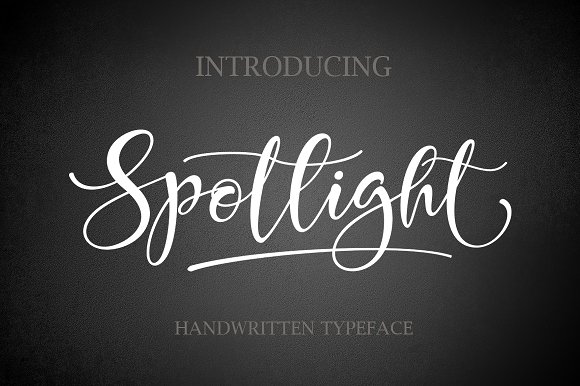
Spotlight: A Hand-Painted Script Font with Boundless Potential
Every designer knows the struggle of finding a typeface that feels both personal and polished. Many script fonts lean too far toward rigid perfection, losing the human touch that makes hand-lettered work so appealing. Others are so loose that they become illegible or inconsistent. Spotlight bridges that gap with a remarkable balance: over 490 hand-painted characters, each one originally drawn by hand and then digitally refined into a flowing, cohesive font. The result is a typeface that reads effortlessly while retaining the subtle irregularities that give handcrafted work its warmth.
Rather than offering a single aesthetic, Spotlight delivers a rich palette of expressive forms. Its letterforms carry natural variation in stroke width, terminal angles, and spacing, mimicking the rhythm of a skilled calligrapher. For anyone who works with words visually—whether on a poster, a website, or a product label—this font opens up possibilities that standard scripts simply cannot match.
What Makes Spotlight Different from Other Script Fonts
Most script fonts rely on a limited set of characters with predictable alternates. Spotlight takes a different approach by packing hundreds of hand-painted glyphs into a single typeface. This depth gives you genuine variety without needing to switch fonts or manually edit outlines. Every letter, numeral, and punctuation mark has been individually crafted, and many characters include multiple stylistic alternates.
Consider what this means in practice. When you typeset a word like Celebration, Spotlight can connect each letter with natural ligatures that avoid the awkward collisions common in simpler scripts. The overshoots on round letters, the slight bounce in baseline alignment, and the gentle swashes on terminal characters all contribute to a look that feels drawn rather than typed. For designers who value authentic handcrafted aesthetics, this is a significant advantage.
Who Benefits Most from a Font Like Spotlight
The versatility of Spotlight makes it relevant across many creative fields. Because the font carries both warmth and legibility, it adapts well to different mediums and message tones. Here are some of the audiences who find it particularly useful:
- Brand and logo designers — For businesses that want to convey approachability, artistry, or tradition, Spotlight provides a signature feel without requiring custom lettering. A café, bakery, or boutique studio can use it as a wordmark or accent typeface and still maintain brand consistency across print and digital.
- Social media content creators — Instagram posts, YouTube thumbnails, and Pinterest graphics benefit from the human quality of hand-painted type. Spotlight adds personality to quotes, titles, and promotional text without looking overly formal or generic.
- Small business owners and product packagers — From candles to craft beverages, packaging often needs to evoke a handmade or artisanal feeling. Spotlight works well on labels, hang tags, and inserts because its organic shapes feel tactile even in digital rendering.
- Event and wedding stationery designers — Invitations, place cards, and signage require a typeface that feels celebratory but remains readable. Spotlight hits that note with elegant swashes and clear character shapes.
- Educators and workshop facilitators — Handouts, course titles, and presentation headers set with Spotlight can give printed materials a friendly, inviting tone that encourages engagement.
Creative Applications That Go Beyond Standard Typography
Spotlight is not limited to setting headlines or pull quotes. Its hand-painted origin invites experimentation with layering, texture, and mixed media. Here are several directions worth exploring.
Layered Compositions with Transparencies and Overprints
Because the letterforms carry natural variation, you can duplicate a word in Spotlight, offset it slightly, and reduce opacity to create a shadow or glow effect that looks dimensional rather than mechanical. Try placing a lighter version of the same text behind a darker one, and experiment with blending modes in your design software. The slight inconsistencies in the typeface make each layer interact organically.
Combining Spotlight with Textured Backgrounds
Hand-painted fonts pair naturally with tactile surfaces like watercolor washes, grain textures, or paper scans. Set Spotlight in a dark ink color over a soft, uneven background to reinforce the handcrafted look. You can also apply a subtle noise or grain filter to the type layer itself to simulate real brush or pen application.
Custom Wordmarks and Monograms
With over 490 characters at your disposal, you can build a custom wordmark or monogram that feels bespoke. Use stylistic alternates for repeated letters to avoid identical shapes, and let the ligatures guide the flow of adjacent characters. For a logo, pair Spotlight with a clean sans serif for the accompanying text to create contrast without competing styles.
Environmental and Signage Design
Whether you are designing a mural, a storefront window, or a digital banner, Spotlight holds up at larger sizes because its hand-painted quality becomes even more apparent when letters are scaled up. The subtle irregularities add visual interest without distracting from the message. For physical signage, consider converting the type to paths and then adding a slight bevelled edge texture to mimic painted wood or metal lettering.
Practical Guidance for Keeping Your Design Clear and Effective
Script fonts can become difficult to read if used indiscriminately. Spotlight is legible, but like any script, it requires thoughtful application to maintain clarity. Follow these guidelines to get the best results.
Prioritize readability for body text. While Spotlight can work for short passages, it shines brightest at display sizes. Avoid setting long paragraphs in any script font. Reserve Spotlight for headlines, subheadings, short taglines, and accent words. For longer reading, pair it with a simple sans serif or serif body typeface.
Watch letter spacing carefully. Hand-painted fonts sometimes need manual kerning adjustments, especially when combining uppercase and lowercase letters or when using swashes. Set your tracking slightly looser than you might for a geometric sans serif, and inspect each word pair for uneven gaps.
Limit the number of swashes per word. Spotlight includes beautiful extended swashes, but using too many in a single line can reduce legibility. Pick one or two letters per word to carry a flourish, and let the rest of the word remain straightforward.
Test on your target platform. Fonts render differently on screen versus in print. On websites and mobile apps, script fonts are particularly vulnerable to rendering issues at small sizes. Preview Spotlight at the exact size and medium you plan to use before finalizing your design. For web use, confirm that your font licensing allows embedding and that fallback fonts are defined in your CSS.
Adapting Spotlight for Different Audiences and Platforms
The same font can read very differently depending on context. Understanding how Spotlight behaves across formats helps you tailor your message appropriately.
Digital Platforms: Social Media, Websites, and Email
On Instagram and Pinterest, where visual appeal drives engagement, Spotlight works well for quote cards, announcement graphics, and story highlights. Keep the text short—three to six words maximum—and use high-contrast colors. For email headers, use Spotlight sparingly so the message remains scannable. On websites, limit its use to hero headings and navigation accents to preserve readability on mobile screens.
Print Applications: Invitations, Packaging, and Posters
Print gives Spotlight the opportunity to shine at high resolution. On invitations, use the font for the couple's names or the event title, then switch to a clean sans serif for details like date and location. For product packaging, Spotlight can serve as the brand name on a front label while ingredient lists or descriptions use a simpler typeface. Posters benefit from large, bold headlines set in Spotlight with generous leading.
Video and Motion Graphics
Moving text introduces additional complexity. When using Spotlight in video titles or lower thirds, animate the letters subtly to preserve readability. A gentle fade or scale effect works better than rapid transitions. Because script fonts read as more organic, avoid overly mechanical animations like rigid position keyframes. Instead, treat the letterforms like drawn marks that naturally appear and disappear.
Practical Project Ideas to Try with Spotlight
If you are looking for a specific starting point, consider one of these projects. Each leverages Spotlight's hand-painted nature while staying grounded in real-world use.
- A limited-edition product label for a seasonal item such as a small-batch hot sauce, a handmade soap, or a specialty coffee blend. Use Spotlight for the product name, and pair it with a muted color palette and a textured background.
- A set of social media quote templates for an inspirational or lifestyle account. Use Spotlight for the quote itself, and maintain a consistent layout with varying background patterns. The font's alternates ensure each graphic looks distinct even if the quote structure repeats.
- An event poster for a community workshop or market. Combine Spotlight with a bold sans serif for logistical details. Add a subtle paper fold or shadow effect to give the poster a printed, tangible feel even when shared digitally.
- A personal monogram or signature logo for your own freelance practice or creative side project. Use Spotlight's swashes and ligatures to create a mark that feels unique to you, then use it consistently across your portfolio and correspondence.
- A series of thank-you cards for clients or collaborators. Set the greeting in Spotlight, and keep the message brief and warm. The hand-painted quality of the typeface reinforces the personal nature of the gesture.
Keeping Your Results Original and Audience-Friendly
A font as distinctive as Spotlight invites personalization, but originality does not come from the typeface alone. It comes from how you combine it with other elements—color, layout, imagery, and hierarchy. Avoid overusing the same default ligatures or swashes in every project. Explore the full character set and select alternates that suit the specific tone of each piece.
Consider your audience's comfort with decorative type. A younger, design-savvy audience may welcome elaborate flourishes, while a broader consumer base might prefer a more restrained approach. Test your designs with people outside your immediate circle to see whether the font supports or distracts from your message.
Finally, remember that consistency matters. If you adopt Spotlight for a brand or recurring content series, use it consistently across all touchpoints. That means defining exactly which stylistic alternates, spacing values, and pairings you will use each time. This discipline ensures that the hand-painted quality of Spotlight becomes a recognizable part of your visual identity rather than a one-off experiment.
Spotlight offers the rare combination of handcrafted soul and digital precision. With over 490 characters to explore, you have the flexibility to create work that feels both personal and professional. Whether you are designing a logo, a poster, a package, or a social graphic, this font provides the expressive range you need to stand out while staying clear. Download Spotlight and begin exploring the possibilities it brings to your next project.