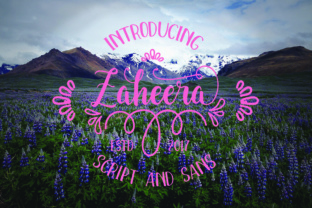
Zaheera: A Fun Script Font with Purpose
Choosing the right font for a project is rarely straightforward. You want personality, but not at the expense of readability. You want something fresh, but not so trendy that it feels outdated next year. That’s where Zaheera enters the conversation. Zaheera is a fun script font that balances playful energy with carefully drawn letterforms. But it’s more than just a script—it comes with Zaheera Sans, a clean, no-nonsense companion that turns it into a versatile type system. Yet many people who download Zaheera make a few common mistakes that limit its potential or, worse, hurt their design. Let’s walk through what those mistakes are and how to avoid them.
Relying on Zaheera for Body Text
The most frequent misunderstanding I see is using a script font like Zaheera for long paragraphs. Scripts are designed to mimic handwriting, which naturally makes them less legible at small sizes or in dense blocks. Even a well-crafted script like Zaheera can fatigue readers when applied to body copy. The result is often a design that feels cluttered and hard to follow. Instead, reserve Zaheera for headlines, short phrases, logos, or display purposes. If you need a readable text font, turn to its companion—Zaheera Sans. This complementary sans-serif face offers clean geometry and consistent spacing, making it ideal for supporting long-form content without competing with the script’s personality.
Overlooking the Value of Zaheera Sans
Many buyers or downloaders fall in love with the script and completely ignore the included Zaheera Sans. That’s a missed opportunity. Zaheera Sans isn’t just a default fallback; it’s a deliberate pair that harmonizes with the script’s proportions and mood. When you use only the script, you lose the contrast that makes a design feel polished. A poster, website header, or social media graphic benefits from the interplay between a lively script and a restrained sans. For example, use Zaheera for the main tagline and Zaheera Sans for the supporting details like dates, locations, or contact information. This pairing creates hierarchy and makes your message both engaging and easy to scan.
Assuming Fun Means Unprofessional
There’s a persistent belief that playful fonts are inherently casual or unprofessional. That assumption can lead people to dismiss Zaheera for business-related projects. In reality, a fun script can be perfectly professional when used with intention. The key is context. A cupcake shop, a children’s brand, a creative agency, or even a wedding invitation all benefit from a touch of warmth and approachability. Zaheera’s smooth curves and consistent stroke weight keep it from looking messy or overly decorative. The mistake is applying it to a conservative law firm brochure or a formal report without adjusting the tone. Know your audience and match the font’s energy to the project’s purpose. When the setting is right, Zaheera adds a humanizing element that rigid typefaces cannot.
Neglecting Spacing and Kerning Adjustments
Script fonts often come with default letter spacing that assumes ideal conditions. But in real-world use, you almost always need to tweak tracking or kerning. Zaheera’s connecting strokes and ligatures are designed to flow naturally, but if you enlarge the font for a headline, the gaps between words or certain letter pairs can become uneven. I have seen designs where the script looks cramped in one place and loose in another, undermining the handcrafted feel. The fix is simple: always preview Zaheera at the actual size you plan to use, and adjust the tracking in your design software. For tight headlines, a slight increase in letter spacing can improve readability. For shorter words, you might tighten them. Treat each application individually rather than trusting the default.
Using Zaheera Without Checking Licensing
This might sound like a legal technicality, but it’s a practical mistake that can affect your budget and timeline. Script fonts are sometimes treated as decorative and people assume they are free or have lenient licenses. Zaheera itself may come with standard desktop, web, or app licenses depending on where you obtain it. If you use it in a commercial product—say, a logo for a client, a mobile app interface, or merchandise—without verifying the license, you risk having to replace the font later or pay unexpected fees. Always read the license agreement before downloading or purchasing. If you are designing for multiple platforms, confirm that your license covers both the script and the sans, and whether it includes additional users or projects. This upfront check saves time and prevents last-minute redesigns.
Forgetting to Test on Different Backgrounds
Zaheera’s playful curves and thin strokes can disappear or become hard to read on busy backgrounds, low-contrast backdrops, or small screens. A common oversight is designing only on a white background and assuming it will work everywhere. For example, a light gray or pastel background may reduce contrast enough that the script’s finer details blur, especially at smaller sizes. Similarly, using Zaheera over a photograph without adding a shadow or background block can make the text unreadable. To avoid this, always test Zaheera and Zaheera Sans on the exact backgrounds you plan to use—both in print and on screen. If readability suffers, consider adding a subtle text outline, increasing the font weight (if available), or choosing a darker version of the background. For digital projects, check how the font renders on different devices and browsers.
Pairing It with the Wrong Fonts
Because Zaheera comes with its own sans companion, you already have a safe pair. But some designers try to mix Zaheera with other script fonts or overly ornate typefaces, creating visual chaos. Another mistake is pairing it with a sans-serif that has a very different x-height or mood, like a geometric sans with rigid circles. The result feels disjointed. When you do venture beyond Zaheera Sans, look for complementary fonts that share a similar level of warmth or contrast. A gentle humanist sans, a subtle serif, or a relaxed slab can work well. The goal is to let Zaheera remain the star while the other font supports without competing. Test your pair by squinting at the layout—if the hierarchy is still clear, the combination is likely successful.
Not Considering Project Context
One of the reasons people end up disappointed with a font is that they choose it for the wrong project. Zaheera works beautifully for invitations, greeting cards, social media posts, blog headers, packaging for handmade goods, and branding for lifestyle businesses. It can feel out of place in dense data presentations, long e‑book content, or highly technical documents. The mistake is forcing a script into a role it wasn’t built for. Before committing, ask yourself: Will my audience read this in a hurry or leisurely? Is the tone friendly, formal, or informative? If the project demands speed and clarity, lead with Zaheera Sans and use the script as an accent. If it demands personality and warmth, let Zaheera take center stage. The flexibility of having both typefaces in one family makes this decision easier—you just need to make it deliberately.
In the end, using Zaheera well comes down to respecting its nature as a fun script with a practical sibling. Avoid treating it as a one‑size‑fits-all solution. Pay attention to spacing, licensing, backgrounds, and pairing. Use Zaheera Sans to ground the design and provide readability. By sidestepping these common mistakes, you can unlock the full potential of both fonts—and create work that feels both playful and professional.