Rotulona Hand: A Practical Guide to Using This Thick Handwritten Font in Design Workflows
Typography choices often define the tone of a project before a single word is read. When you need a typeface that conveys warmth, spontaneity, and a handcrafted feel without sacrificing readability, Rotulona Hand deserves a close look. This thick handwritten font, created with a fat spherical tip pen, carries a cheerful and carefree character that works well across graphic design, advertising, packaging, and digital content. But like any design asset, its real value depends on how you integrate it into your process. This article explores practical ways to use Rotulona Hand before, during, and after your projects, how it interacts with other tools and methods, and what considerations matter for long-term use.
What Rotulona Hand Is and Where It Belongs in a Design Process
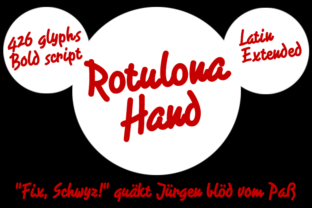
Rotulona Hand is not a neutral, utilitarian font. Its thick strokes, rounded terminals, and irregular weight distribution immediately signal that a human hand made these marks. The spherical tip pen effect gives each letter a slightly unpredictable edge, which is precisely what makes it feel alive. This is not a font you choose for body text in a corporate report. Instead, it belongs in contexts where personality and approachability matter more than strict uniformity.
In a typical design workflow, Rotulona Hand fits best during the conceptual and execution phases rather than the initial research or final polish stages. You might select it early when defining the visual voice of a campaign, or apply it during production when you need to inject energy into headlines, calls to action, or short messages. It can also appear after the main layout is done, as a finishing layer that adds a handwritten accent to an otherwise clean composition.
How Rotulona Hand Interacts with Other Design Tools, Assets, and Decisions
No typeface works in isolation. Rotulona Hand interacts with your broader toolkit in several ways that affect both workflow and outcome.
Pairing with Complementary Fonts
Because Rotulona Hand is thick and expressive, it pairs best with cleaner, lighter typefaces that provide visual breathing room. Sans-serif fonts with consistent stroke weight—such as a neutral grotesk or a geometric sans—allow Rotulona Hand to stand out without clashing. For example, using Rotulona Hand for a hero headline and a clean sans-serif for subheadings and body copy creates a clear hierarchy. This pairing strategy reduces cognitive load for the viewer and keeps your layout organized.
Working with Color and Texture
The spherical pen origin of Rotulona Hand gives it a tactile quality that benefits from textured backgrounds. Consider using it on paper textures, subtle gradients, or matte color blocks. The font also holds up well when reversed out of dark backgrounds, provided you adjust tracking and size for legibility. In digital contexts, avoid placing it over busy photographic backgrounds—thin details in the letters may get lost.
Integration with Layout and Brand Guidelines
If you work within brand guidelines, test Rotulona Hand against existing brand colors and secondary typefaces early in the process. Some brand systems require strict consistency, and a handwritten font may only fit for specific campaigns or seasonal messaging. In my own workflow, I maintain a small library of approved display fonts for different tones, and Rotulona Hand sits in the "casual and friendly" category. Documenting where it can and cannot be used prevents inconsistencies later.
Preparing Your Files and Environment for Rotulona Hand
Before you drop Rotulona Hand into a project, take a few minutes to prepare. This upfront effort saves time during production and ensures consistent output across deliverables.
- Check licensing. Confirm that your intended use—commercial, web, print, or broadcast—is covered by the license you have. Some font licenses restrict embedding in apps or limit the number of users.
- Install properly. Install the font on all machines involved in the project, including remote collaborators' systems. Use a font management tool to activate and deactivate fonts per project to avoid conflicts.
- Test at different sizes. Rotulona Hand is thick by nature, so at smaller sizes it can become muddy. Test it at the actual dimensions it will appear in your final output. For print, set it at least 18–24 points for headlines; for web, use equivalent relative sizes.
- Adjust tracking and kerning. Handwritten fonts often benefit from slightly looser tracking than mechanical fonts. In Rotulona Hand, the irregular spacing inherent in the pen-drawn style may need manual kerning adjustments in pairs like "AV" or "WA" to avoid awkward gaps.
- Set baseline expectations. If you are working with a team, brief them on the font's characteristics. Let designers and developers know that Rotulona Hand is best for short text blocks and that it will not render well in body copy below a certain size.
Using Rotulona Hand During the Creative Process
Once the preparation is done, you can integrate Rotulona Hand into your active workflow. Here are three practical ways it fits into different phases of a project.
Early Concepting and Mood Boards
During the brainstorming phase, Rotulona Hand can help set a visual direction before detailed layouts begin. Use it in mood boards alongside color swatches, imagery, and texture samples. Because the font conveys a handwritten, approachable feel, it signals to clients or stakeholders that the project is leaning away from formal corporate aesthetics. This early alignment reduces the chance of direction changes later.
Headline and Call-to-Action Design
When you move into layout, reserve Rotulona Hand for short, impactful text. Headlines, taglines, button labels, and pull quotes benefit from its warmth. In advertising, a single word set in Rotulona Hand can anchor an entire visual. For example, a poster for a bakery might use the word "Crafted" in Rotulona Hand, with supporting details in a clean sans-serif. The contrast does the work.
Highlighting User-Generated or Informal Content
In digital products, social media graphics, or email campaigns, Rotulona Hand can visually separate user testimonials, informal notes, or highlight boxes from the rest of the content. Its handwritten origin aligns naturally with quotes or personal messages. I have used it in email headers where the subject line is reinforced by a "handwritten" note at the top of the email body—subscribers responded noticeably more to that format.
After the Project: Consistency, Quality Control, and Long-Term Use
Integrating Rotulona Hand into your workflow does not end when you export the final file. Consider what happens after delivery to maintain quality and reusability.
Quality Control Checks
Before finalizing any output, inspect every instance of Rotulona Hand in the design. Look for:
- Characters that appear too faint or too heavy due to the pen effect
- Kerning pairs that create visual gaps or overlaps
- Text that breaks awkwardly across lines
- Overall legibility at the intended viewing distance
For print, request a proof and examine the font under good lighting. For digital, test across browsers and devices, especially if you are using web fonts. Rotulona Hand's thick strokes can look different on screen versus paper, so verify both.
Creating a Usage Guide for Your Team or Clients
If you expect to use Rotulona Hand across multiple projects, document how to apply it consistently. A one-page guide can cover:
- Approved sizes and use cases
- Recommended pairings with other fonts
- Do's and don'ts (e.g., avoid stretching or distorting the font)
- Examples of good and poor applications
This guide becomes a reference for anyone who works on your brand or projects, ensuring that Rotulona Hand is used intentionally rather than arbitrarily.
Archiving and Reuse
When a project ends, archive the font file and any custom kerning adjustments you made. If you created project-specific OpenType features or adjusted spacing in specific software, save those settings alongside the project files. This makes it easier to replicate the same look if you revisit the project later or create a follow-up campaign.
Practical Observations from Using Rotulona Hand in Real Workflows
Having used Rotulona Hand across print layouts, social media templates, and packaging mockups, I can offer a few observations that might save you time.
- Spacing matters more than usual. Because the font is thick, characters set too close together create dark blobs rather than readable text. Generous letter-spacing improves both legibility and the overall aesthetic. Do not be afraid to add 10–20% more tracking than you would with a standard display font.
- Avoid all caps for long phrases. Rotulona Hand in all uppercase loses the natural rhythm of the handwritten style and becomes harder to read. Use sentence case or title case for most applications, and reserve all caps for very short bursts like a single word or an acronym.
- Combine with real handwriting sparingly. If your design includes actual handwritten elements alongside Rotulona Hand, the contrast can be jarring unless the handwriting matches the font's weight and pen style. Either commit entirely to the font or use actual handwriting consistently.
- Test for accessibility. Thick handwritten fonts can pose legibility challenges for viewers with visual impairments or reading difficulties. Ensure that any text set in Rotulona Hand is paired with sufficient color contrast and that the most important information is also communicated through visual hierarchy or supporting text.
Integrating Rotulona Hand into a Broader Content Strategy
For marketers, bloggers, and small business owners, Rotulona Hand can become a recognizable element of your visual identity if used consistently. Consider its role across different content types:
- Social media posts: Use Rotulona Hand for quote cards, announcements, and headers. Pair it with your brand colors and a clean sans-serif for descriptions.
- Email newsletters: Set the subject line preview or a highlighted call to action in Rotulona Hand. Because the font signals personality, it can increase open and click rates when used sparingly.
- Product packaging: Rotulona Hand works well for short product names, flavor labels, or ingredient highlights. Its thick strokes stand out on small packages.
- Blog headers: Use it for pull quotes or section dividers within articles. This breaks up long text blocks and adds visual interest without requiring custom illustration.
The key is restraint. Rotulona Hand is a display tool, not a workhorse. Reserve it for moments where you want the reader to feel something—welcome, comfort, excitement, or trust. Overusing it dilutes that effect.
Final Considerations for Long-Term Use
Rotulona Hand is not a font you set and forget. Its effectiveness depends on thoughtful placement, appropriate sizing, and careful pairing. If you treat it as a specialty asset that you reach for in the right contexts, it will serve you well across many projects. Keep your usage documented, your files organized, and your expectations realistic. A handwritten font cannot do everything, but when it fits, it fits better than any mechanical alternative.
Whether you are a graphic designer preparing a campaign, a small business owner refreshing your brand, or a blogger looking for a visual edge, Rotulona Hand offers a genuine, human quality that resonates with audiences. By integrating it into your workflow with intention—preparing properly, applying it thoughtfully during the creative process, and maintaining consistency after delivery—you make the most of what this thick spherical pen font has to offer.