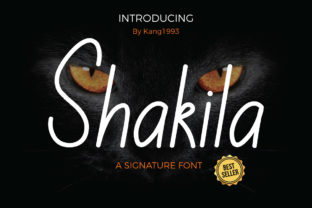
Shakila: A Smooth Line Font for Modern Creatives
Fonts carry personality. Some are loud. Others whisper. A few manage to feel both deliberate and effortless at the same time. Shakila belongs in that last category. It is a smooth line font, built around clean, uninterrupted strokes that give text a polished yet approachable feel. Paired with Olivia, a hand-drawn font that leans into organic imperfection, the combination opens up a wide range of creative possibilities for designers, marketers, bloggers, and small business owners who want their work to stand out without screaming for attention.
Understanding what Shakila offers starts with looking at its structure. Smooth line fonts prioritize consistency and flow. Every curve connects naturally to the next. There is no roughness, no abrupt angle that breaks the rhythm. This makes Shakila particularly useful in contexts where clarity and elegance matter. It is legible, graceful, and versatile enough to move between formal and friendly messaging without losing its core identity.
What Makes Shakila Different
Not every smooth font manages to feel warm. Some are so polished they become cold or impersonal. Shakila avoids that pitfall. Its lines retain a subtle softness, a slight human quality that keeps the text from feeling mechanical. This balance is rare. It is why Shakila works just as well on a wedding invitation as it does on a brand’s homepage header.
Olivia, by contrast, is hand drawn. It brings irregularity, texture, and a sense of spontaneity. Where Shakila flows, Olivia wanders. Where Shakila is refined, Olivia is raw. Together, they create a tension that designers can exploit for storytelling, branding, and visual hierarchy.
Understanding these differences helps you decide when to lead with Shakila and when to let Olivia take the spotlight. Shakila carries authority. It suggests thoughtfulness. Olivia suggests authenticity. Using both in the same project lets you speak in two voices at once, which is often exactly what a brand or message needs.
Where Shakila Shines in Design Projects
Shakila is not a one-trick font. Its smooth construction makes it adaptable across media, formats, and audiences. Below are some of the most effective applications, with practical guidance for each.
Branding and Identity Work
For logos, wordmarks, and brand headers, Shakila brings a professional finish that feels current without chasing trends. Its clean lines hold up well at small sizes, which is critical for social media avatars or favicons. Use Shakila as the primary brand font when you want to communicate reliability, quality, and a modern sensibility. Pair it with Olivia for accent text, taglines, or pull quotes that need a more personal touch.
A small business owner in the wellness space, for example, could use Shakila for their logo and menu headings, then bring Olivia in for testimonials or handwritten-style calls to action. This combination signals both competence and care.
Editorial and Publishing Layouts
Magazines, newsletters, and ebooks benefit from Shakila’s readability. Because smooth line fonts reduce visual noise, readers spend less effort decoding letter shapes and more time absorbing meaning. Use Shakila for body text in short-form pieces or for subheadings in longer articles. It works especially well in digital publishing, where screen clarity matters.
For print projects like brochures or lookbooks, Shakila can anchor a clean layout while Olivia adds hand-drawn accents like section dividers, illustrated quotes, or side notes. The contrast keeps the design dynamic without overwhelming the content.
Digital Interfaces and Social Media
On screens, clean typography improves user experience. Shakila renders well across devices and resolutions, making it a strong candidate for website headers, app interfaces, or email marketing templates. Use it for primary navigation labels, hero section text, or product names.
Social media content creators can use Shakila for quote graphics, announcement posts, or carousel titles. Its smooth lines ensure text remains legible even on small mobile screens. Olivia can serve as a secondary font for comment overlays, stickers, or story highlights that need a human, unpolished feel.
Pairing Shakila with Olivia for Contrast
The real strength of working with these two fonts comes from understanding contrast. Shakila is smooth, even, and controlled. Olivia is irregular, loose, and expressive. When placed together, they create visual interest without competing for attention if you manage scale and placement carefully.
A practical approach is to assign roles. Shakila handles structure: headlines, navigation, labels, and any text that needs to convey authority or clarity. Olivia handles emphasis: short phrases, decorative elements, signature-style lines, or anything meant to feel personal or intimate. This division keeps the design organized while allowing each font to do what it does best.
For instance, a freelance designer building a portfolio site could set section titles in Shakila and use Olivia for the tagline beneath their name. The result is a page that reads as both professional and approachable. A wedding stationery suite could use Shakila for the couple’s names and Olivia for the invitation wording, balancing formality with warmth.
Adapting Shakila for Different Audiences and Platforms
Different viewers respond to different cues. A corporate audience may prefer the stability of Shakila alone, without the humanizing effect of Olivia. A creative audience might respond better to an expressive mix. Knowing your audience helps you adjust the ratio.
For B2B marketing materials, lead with Shakila. Keep Olivia in the background or omit it entirely. For lifestyle blogs, personal branding, or creative portfolios, let Olivia take more space. Shakila still anchors the layout, but Olivia adds personality that resonates with audiences looking for authenticity.
Platform matters too. On LinkedIn, Shakila-heavy designs signal professionalism. On Instagram, a 70-30 split favoring Olivia may feel more native. On a website, Shakila dominates for readability, while Olivia appears in hero graphics or hover states. Test different combinations with your actual audience to see what lands.
Practical Tips for Working with Smooth Line Fonts
Using Shakila effectively is not just about picking it as a font. Typography decisions affect how people perceive your message. Here are grounded recommendations for getting the most out of Shakila and similar smooth line fonts.
- Mind the spacing. Smooth line fonts can feel tight if letter spacing is too narrow. Give Shakila room to breathe, especially at larger sizes. Adjust tracking in your design software until each character sits comfortably.
- Limit font weights. Shakila likely offers a few weight options. Stick to one or two per project to maintain consistency. Use weight changes for hierarchy rather than switching between unrelated fonts.
- Pair with intentional contrast. If you use Olivia alongside Shakila, make sure their sizes and placements are deliberate. Olivia should never overpower Shakila in places where clarity is paramount.
- Test on real screens. What looks perfect in a design mockup may render differently on a phone or browser. Preview Shakila in the actual environment where it will be seen.
- Reserve for headers and short text. While Shakila is readable, smooth line fonts are often best suited for headlines, subheadings, and display purposes rather than long body copy. Use a complementary serif or sans-serif for extended reading.
Creative Project Ideas Using Shakila
Inspiration is most useful when it comes with a clear starting point. Below are project ideas that put Shakila’s strengths into practice, with variations for different creative goals.
- Personal brand board. Build a brand style tile using Shakila for the name and tagline. Use Olivia for a handwritten mission statement. Include color swatches and texture samples that reflect the same smooth-meets-organic balance.
- Email newsletter redesign. Update the header of your newsletter with Shakila. Use Olivia for a signature close or a hand-drawn call-to-action button. Test open rates and click-throughs to see if the change affects engagement.
- Product packaging label. Design a label for a small-batch product. Shakila carries the product name and essential details. Olivia adds a hand-numbered batch line or a short note from the maker.
- Social media highlight reel. Create a set of Instagram story templates. Shakila appears in the title frames. Olivia appears in quote overlays or question prompts. Keep the color palette consistent across both.
- Workshop or course slide deck. Use Shakila for slide titles and key takeaways. Olivia appears only on the title slide or closing slide to add a human touch. This keeps the learning content clear while still feeling warm.
- Portfolio introduction page. A single-page website for a creative freelancer. Shakila handles the navigation, project categories, and main headline. Olivia appears in the bio section, giving the introduction a handwritten feel.
Keeping Results Clear, Consistent, and Audience-Friendly
Typography is a tool, not a decoration. When you use Shakila or Olivia, every choice should serve the message and the audience. Clarity comes first. If a font choice makes text harder to read or a layout harder to scan, it does not matter how beautiful the letters look alone.
Consistency means setting rules and sticking to them. Decide where Shakila appears and where Olivia appears, then repeat those patterns across every page or post. Your audience will subconsciously learn the system, which builds trust and recognition.
Originality does not require novelty for its own sake. Using Shakila in a thoughtful, intentional way is original because it reflects your specific decisions about hierarchy, contrast, and tone. Let the fonts support your content, not compete with it.
Shakila is a smooth line font that brings clarity and grace to any project. Olivia is a hand drawn font that adds life and imperfection. Together, they give creators a flexible toolkit for communicating with both confidence and warmth. Whether you are building a brand, writing a newsletter, or designing a social campaign, the combination of smooth structure and hand-drawn texture can help your message feel both professional and genuinely human.