Queen of Camelot 2.0: A Revised Display Font for Branding and Publication Work
When evaluating typefaces for a project, the distinction between a simple update and a meaningful revision often determines whether the font meets your actual needs. Queen of Camelot 2.0 represents a significant reworking of its predecessor, with changes that affect legibility, character set completeness, and overall usability. This article examines what the 2.0 version offers, where it excels, and where you might want to look elsewhere.
What Queen of Camelot 2.0 Is
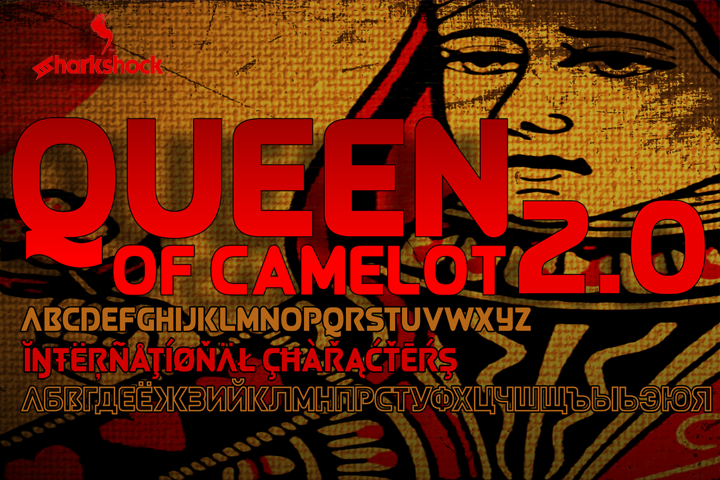
Queen of Camelot 2.0 is an all-caps display typeface built around rounded corners and uniform stroke width. The original version has been redrawn from the ground up, with every glyph reconstructed rather than simply adjusted. The result is a font family that includes three distinct versions, each sharing the same core design DNA but offering subtle variation for different use cases.
The character set covers basic Latin, extended Latin, diacritics, Cyrillic, and fractions. Kerning has been implemented across the full glyph set, which is a practical improvement over earlier versions where spacing consistency was more limited. Punctuation is included, and the overall metric structure has been refined to produce more predictable line lengths and spacing behavior.
Because the font uses uniform stroke width throughout, it falls into the category of monoline or geometric display faces. The rounded corners give it a softer visual edge compared to sharp-angled all-caps fonts, which can influence how readers perceive both the text and the brand it represents.
Why Designers and Brand Managers Consider This Font
Several practical factors draw attention to Queen of Camelot 2.0. The expanded language support matters if your project requires Cyrillic or extended Latin characters, as not every display font offers this coverage. The inclusion of fractions is also a practical addition for packaging, signage, or data-heavy layouts where numeric readability matters.
The three-version family structure gives you flexibility without overwhelming your workflow. Instead of navigating dozens of weights and styles, you can select from three variations that share consistent proportions and spacing. This reduces the time spent adjusting kerning pairs or rebalancing layouts when switching between versions.
Kerning improvements in this release address a common pain point with display fonts used at large sizes. Poor kerning becomes obvious in headlines, logos, and social media graphics, where each letterform carries more visual weight. The redrawn glyphs also mean that individual characters now have more consistent curves and terminals, which improves overall texture when text is set as a block or phrase.
Strengths of This Version
- Consistent spacing across versions. Because all three variants share the same metric foundation, you can switch between them without reworking your layout. This is valuable when you are still exploring which version best suits your project.
- Expanded character set. For a display font, the inclusion of Cyrillic and diacritics is not always guaranteed. If your audience reads in multiple languages, this can save you from having to find a secondary typeface.
- Clean geometric form. The monoline rounded structure reads clearly at medium to large sizes. It does not introduce unnecessary complexity, which makes it suitable for applications where quick recognition matters, such as signage or mobile social media graphics.
- Fraction support. This is a niche but practical inclusion for anyone working with measurements, statistics, or pricing in display contexts.
Limitations and Tradeoffs
- Limited to all-caps. If your project requires mixed case or extensive lowercase text, this font is not a fit. The all-caps constraint also means that long reading passages can feel visually demanding, as uppercase text generally slows reading speed compared to sentence case.
- Uniform stroke width reduces contrast. The monoline design creates a consistent visual weight, but it also lacks the thick-thin contrast that some display fonts use to create hierarchy or emphasis. If you rely on contrast to guide the reader's eye, you may need to pair this font with another typeface.
- Rounded corners affect tone. While rounded corners can feel approachable or friendly, they can also feel informal depending on the context. For conservative or high-end branding, a sharper or more traditional display face may better align with the intended tone.
- Three versions are a limited palette. Compared to typefaces that offer multiple weights, widths, or optical sizes, Queen of Camelot 2.0 provides fewer options for fine-tuning text across different media. You may need to supplement it with another family for body text or smaller sizes.
Where Queen of Camelot 2.0 Is a Strong Fit
This typeface performs well in situations where visual impact matters more than extended readability. Logo work, especially for brands that want a rounded but structured appearance, can benefit from the consistent geometry and improved kerning. Social media graphics, where text often appears at large sizes and for short durations, are another natural application. The uniform stroke width ensures that the text remains legible even when rendered at small screen sizes or low resolutions.
Sports-related advertising and branding also align with the font's characteristics. The all-caps format conveys energy and directness, while the rounded corners keep the tone from feeling aggressive. Magazine headlines, particularly in lifestyle, entertainment, or design publications, can use this font to create a clear visual hierarchy without competing with surrounding imagery.
Projects that require Cyrillic or extended Latin support will find this family more useful than many comparable display faces. If you are producing packaging, event materials, or advertising for an international audience, the built-in language coverage reduces the need for additional font licensing or character substitution.
When Alternatives Are Worth Considering
If your project involves body text, extended paragraphs, or any situation where readers need to absorb information over time, Queen of Camelot 2.0 is not the right choice. The all-caps format and uniform stroke width become fatiguing in longer reading contexts. In these cases, a typeface designed for body copy, ideally with multiple weights and optical sizes, will serve you better.
For projects that require a more formal or traditional appearance, the rounded corners may feel out of place. Legal documents, financial reports, or luxury branding often benefit from typefaces with sharper serifs or greater contrast between thick and thin strokes. Similarly, if your brand identity relies on a handwritten, script, or decorative aesthetic, a monoline geometric face may feel too rigid.
When you need more than three variations within a single family, you may outgrow this font quickly. If your workflow demands fine control over weight, width, or optical scaling across print, web, and environmental applications, a larger family with a wider range of cuts will give you more flexibility. In that case, consider a typeface with at least four to six weights and corresponding italics or condensed versions.
Practical Guidance for Evaluating This Font
Before committing to Queen of Camelot 2.0, test it in the actual media where it will appear. A display font that looks compelling in a specimen sheet may behave differently when set in a crowded layout, at small sizes, or on a colored background. Pay attention to how the rounded corners interact with other visual elements, especially if you are pairing it with logos, icons, or photography.
If you need to pair this font with a secondary typeface for body text or subheadings, look for a neutral sans-serif or serif that does not compete with the rounded geometry. A simple, straightforward body face will let Queen of Camelot 2.0 carry the visual weight without creating conflict.
Consider the three versions as tools for different roles within the same project. You might use one version for primary headlines, another for subheads or pull quotes, and the third for accent text or numbers. This approach lets you maintain visual consistency without relying on a single style throughout.
Finally, evaluate whether the language coverage matches your actual audience. While Cyrillic and extended Latin support is valuable, it is only useful if you intend to use it. If your project is purely English-language with no diacritics, the expanded character set is a nice-to-have rather than a deciding factor.
Deciding Whether Queen of Camelot 2.0 Aligns With Your Goals
The decision to use Queen of Camelot 2.0 hinges on your project's scale, audience, and visual priorities. If you need an all-caps display font with rounded geometry, consistent spacing, and multilingual support, this typeface offers practical improvements over its predecessor. The redrawn glyphs, better kerning, and three-version family structure make it a viable option for branding, advertising, and editorial work where text appears at display sizes.
If your project requires lowercase, extended body text, a formal tone, or a wide range of weights, other typefaces will likely perform better. The strengths of Queen of Camelot 2.0 are also its boundaries, and understanding those boundaries is key to making an informed choice. Evaluate the font in your actual design context, and let your specific layout and audience guide the final decision.